Schedule, Hours, and Weekday Control
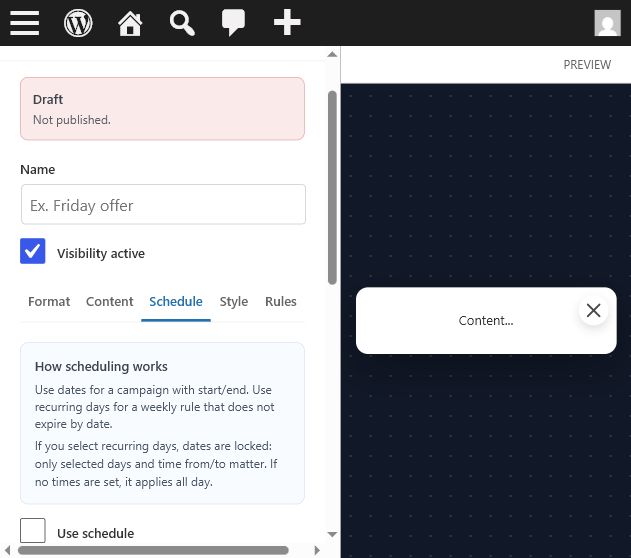
Two scheduling modes
Date range mode uses start and end dates. Time from/to can limit the campaign to certain hours inside that date range. Weekly recurring mode is used when weekdays are selected. In that mode, start and end dates are ignored and the item repeats every selected week.
Hour controls
- If both time fields are empty, the item can show all day.
- If only Time from is set, the item starts at that time and can show until the end of the day.
- If only Time to is set, the item can show from the start of the day until that time.
- Use Clear times when the browser time input does not expose an obvious empty state.
Status meanings
Active now means the item can render. Scheduled means it starts later. Expired means the deadline passed. Conditional means it depends on rules such as audience or device. Plan limit means the current license blocks that format.
Dos modos de horario
Rango de fechas usa fecha inicial y final. Time from/to limita la campaña a ciertas horas. Modo semanal recurrente se activa al seleccionar días de la semana; ahí se ignoran fecha inicial/final y el item se repite cada semana.
Control de horas
- Si ambas horas están vacías, el item puede mostrarse todo el día.
- Si solo Time from existe, empieza a esa hora y sigue hasta fin de día.
- Si solo Time to existe, aparece desde inicio de día hasta esa hora.
- Usa Clear times cuando el input del navegador no permita dejar la hora vacía.
Estados
Active now significa que puede renderizar. Scheduled empieza luego. Expired ya terminó. Conditional depende de reglas. Plan limit significa que la licencia bloquea el formato.
Countdown Deadlines and Expired States
Where countdowns appear
Countdowns can exist as standalone countdown items, inside popups, inside banners, and inside Gutenberg countdown blocks. Popup and banner countdowns use the item schedule. Gutenberg countdown blocks have their own block controls.
Deadline rules
- Date range mode ends at End date plus Time to.
- Recurring all-day campaigns end at 23:59 unless Time to is set.
- Consecutive weekdays end on the last day of the current or next block.
- Separated weekdays end on the current or next selected day.
Troubleshooting
If the countdown looks wrong, verify the site timezone, Time to field, selected weekdays, and whether the item is using date range mode or recurring mode.
Dónde aparecen los countdowns
Los countdowns pueden ser items independientes, aparecer dentro de popups, dentro de banners y en bloques Gutenberg. Popups y banners usan el schedule del item. Los bloques Gutenberg tienen sus propios controles.
Reglas de deadline
- Rango de fechas termina en End date más Time to.
- Campañas recurrentes de día completo terminan a las 23:59 si no hay Time to.
- Días consecutivos terminan en el último día del bloque actual o siguiente.
- Días separados terminan en el día seleccionado actual o siguiente.
Solución de problemas
Si el countdown se ve mal, revisa timezone del sitio, Time to, días seleccionados y si usa rango de fechas o modo recurrente.