Content Tab: Text, Media, HTML, and Visual Template FieldsContent: Texto, Imágenes, HTML y Campos de Plantillas Visuales
Configure standard content and iframe template fields without breaking layout.Configura contenido normal y campos de iframe sin romper el layout.
Content follows the selected format
Content is not an independent list. It shows only the controls that make sense for the current Format. Countdown and Floating CTA use little or none of this tab; Popup, Banner, and Notice support multiple content types; Visual template exposes its template selector and editable fields.
Content types
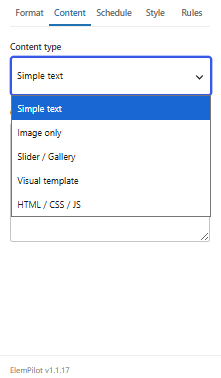
- Simple text: regular WordPress content that can process compatible shortcodes.
- Image only: one Media Library image. Guidance changes for notices, standard banners, and compact banners.
- Slider / Gallery: multiple images; compact banners accept up to two and crop them to a controlled height.
- Visual template: choose a design and edit only the fields it supports, such as image, headline, description, badge, coupon, button, URL, colors, icon, or countdown.
- HTML / CSS / JS: administrator-controlled custom content for a layout of your own, not a way to patch a Visual template.
Visual template content and the iframe
Fields are edited outside the iframe and the preview updates inside it. Character limits protect the layout. Images are cropped to the selected template shape, so square images usually work best in compact popups and mini cards. Preview and published output use the same renderer.
Images with countdowns
For Popup or Banner, enable Add countdown in Format. Image, slider, or HTML remains the content while the timer is added as a separate region. The deadline does not come from Content; it comes from End date and Time to, or the recurring rule in Schedule.
Common question
Can I use another plugin shortcode? Simple text and compatible content areas process WordPress shortcodes. Always test the public page because the external plugin produces the final HTML.
El contenido depende del formato
Content no es una lista independiente: muestra solo los controles que tienen sentido para el Format elegido. Countdown y Floating CTA casi no usan esta pestaña; Popup, Banner y Notice admiten distintos tipos de contenido; Visual template abre su selector de plantilla y campos editables.
Tipos de contenido
- Simple text: contenido normal de WordPress; puede procesar shortcodes compatibles.
- Image only: una imagen elegida desde Media Library. El builder muestra recomendaciones distintas para notice, banner normal y banner compacto.
- Slider / Gallery: varias imágenes; el banner compacto admite como máximo dos y usa un recorte de altura controlada.
- Visual template: elige una plantilla y edita únicamente los campos que soporta: imagen, títulos, descripción, badge, cupón, botón, URL, colores, icono o countdown según el diseño.
- HTML / CSS / JS: contenido personalizado para administradores. Úsalo cuando necesitas un layout propio, no para modificar una Visual template.
Contenido de Visual template e iframe
Los campos se editan fuera del iframe y el preview se actualiza dentro. Los límites de caracteres protegen el diseño. La imagen se recorta según la forma de la plantilla, por lo que una imagen cuadrada suele funcionar mejor en popups compactos y mini cards. Preview y salida pública usan el mismo renderer.
Imágenes y countdown
En Popup o Banner activa Add countdown desde Format. La imagen, slider o HTML permanece como contenido y el contador se añade como una región separada. El deadline no se escribe en Content: procede de End date y Time to, o de la regla recurrente configurada en Schedule.
Pregunta común
¿Puedo usar un shortcode de otro plugin? Simple text y las áreas compatibles procesan shortcodes de WordPress. Prueba siempre el resultado en la página pública porque el HTML final lo produce el plugin externo.