
Schedule, Hours, and Weekday ControlHorario, Horas y Control por Días
Control exactly when campaigns can appear.Controla exactamente cuándo pueden aparecer las campañas.
When Schedule is off
If Use schedule is unchecked and no recurring days are selected, the item has no time restriction. Its status is Active now and it can appear whenever publication, active state, Rules, device, audience, and plan checks also pass.
Date campaigns
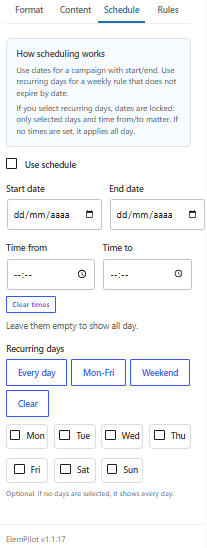
Enable Use schedule to use Start date and End date. You may leave either side empty: Start date alone means “from this date with no end date”; End date alone means “until this date with no start date.” Without a time, Start date begins at 00:00 and End date ends at 23:59:59 in the WordPress timezone. An end earlier than the start creates an invalid schedule and the item stays hidden.
Daily time windows
- Both empty: all day.
- Only Time from: that time through 23:59.
- Only Time to: 00:00 through that time.
- Time from before Time to: a normal window such as 09:00–18:00.
- Time from after Time to: an overnight window such as 22:00–02:00.
Times repeat on every allowed day inside the date range. Clear times returns both controls to a truly empty value.
Recurring weekdays
Selecting any weekday switches ElemPilot to weekly recurrence, turns Use schedule off, clears Start date and End date, and locks both date fields. Only the checked days and time window apply. With no times, the item can show all day on those weekdays. Every day, Mon–Fri, and Weekend are presets; Clear removes recurrence.
If no dates or days are selected
With Schedule off, the item remains available all the time. With Schedule on but dates empty, there is no date boundary; any configured hours apply every day. If hours are also empty, the practical result is all day.
Dashboard states
- Active now: the current time passes the rule.
- Scheduled / Starts tomorrow: the start has not arrived or today is outside the recurring day/time window.
- Expired: End date and Time to have passed.
- Invalid schedule: the end is earlier than the start.
- Conditional: time passes, but the configured audience controls who can see it.
Timezone
Every comparison uses Settings → General → Timezone in WordPress, which may differ from the visitor device clock.
Qué ocurre cuando Schedule está apagado
Si Use schedule está desmarcado y no hay días recurrentes, el item no tiene restricción temporal: su estado es Active now y puede mostrarse siempre que también pase Rules, dispositivo, audiencia, plan y estado de publicación.
Campaña por fechas
Activa Use schedule para usar Start date y End date. No es obligatorio completar ambas: solo Start date significa “desde esta fecha sin fecha final”; solo End date significa “hasta esta fecha sin fecha inicial”. Sin hora, Start date comienza a las 00:00 y End date termina a las 23:59:59 según la zona horaria de WordPress. Si la fecha final queda antes de la inicial, el horario es inválido y el item no se muestra.
Horas diarias
- Ambas vacías: todo el día.
- Solo Time from: desde esa hora hasta 23:59.
- Solo Time to: desde 00:00 hasta esa hora.
- Time from anterior a Time to: ventana normal, por ejemplo 09:00–18:00.
- Time from posterior a Time to: ventana nocturna que cruza medianoche, por ejemplo 22:00–02:00.
Las horas limitan cada día permitido dentro del rango de fechas. Clear times deja ambos campos realmente vacíos.
Días recurrentes
Al seleccionar uno o más días, ElemPilot cambia a repetición semanal, desactiva Use schedule, borra Start date y End date y bloquea esos campos. Solo cuentan los días marcados y la ventana horaria. Sin horas, se muestra todo el día en esos días. Every day, Mon–Fri y Weekend son atajos; Clear elimina la recurrencia.
Si no eliges fechas ni días
Con Schedule apagado, el item queda siempre disponible. Con Schedule activado pero fechas vacías, no existe límite de fecha; si hay horas, se aplican diariamente. Si tampoco hay horas, el resultado práctico es todo el día.
Estados del dashboard
- Active now: la regla temporal permite mostrarlo ahora.
- Scheduled / Starts tomorrow: todavía no llegó el inicio o hoy no coincide con la recurrencia/horas.
- Expired: pasó End date y Time to.
- Invalid schedule: el final es anterior al inicio.
- Conditional: el horario pasa, pero la audiencia configurada condiciona quién lo ve.
Zona horaria
Todas las comparaciones usan Settings → General → Timezone de WordPress, no necesariamente la hora del dispositivo del visitante.